Catch every error
before your users do.
A focused error tracker for Ruby on Rails teams who deploy on Friday afternoons. Group, resolve, and triage your way out of production fires — without the dashboard sprawl.
Built for Ruby on Rails · Hosted in Europe · Invite only
Rails error tracking,
without the detour.
Segfault Bin is a focused production error tracker built specifically for Ruby on Rails teams. It combines exception monitoring, a slow query analyzer, N+1 detection, uptime checks, logs, GitHub dependency alerts, reports, and AI-assisted triage in one installable web app.
- What does Segfault Bin monitor?
- Rails exceptions and their occurrences, application logs, slow and N+1 queries, uptime checks, open dependency vulnerabilities from GitHub, regressions, affected users, and resolution activity.
- Where is customer data hosted?
- In Europe. Segfault Bin is built by Phenomenal Development Oy Ltd. in Rauma, Finland, with privacy controls and project-specific retention.
- Can an AI assistant read our errors?
- Yes — Segfault Bin is an MCP server. Claude, or any MCP client, connects over OAuth and can list, read and triage issues, logs, slow queries and uptime, scoped to the projects that person can already open.
- Can it be installed like a native app?
- Yes. Segfault Bin is a Progressive Web App and can be added to supported iPhone, iPad, Mac, and desktop environments for a focused app experience.
Everything you need.
Nothing you don't.
Designed for shipping, not for dashboards. Notice the error, find the event, push a fix. No project-management theatre, no AI features that don't actually help you read a stack trace.
Group by fingerprint
Stop drowning in duplicates. One issue, every occurrence — with the timeline of how it spread.
Resolve, ignore, snooze
Ignore rules that match how you actually work: by time, by event count, or by affected-user threshold.
AI fix prompts
One button turns an issue into a prompt built for a coding agent — the exception, the frames that matter, the context, the queries caught alongside it. Paste it where you write code.
Terminal mode
An optional 1986 amber-phosphor CRT skin for the whole app. Scanlines, screen-tear glitches, VT323 type. One toggle, full nostalgia.
Uptime monitoring
Periodic HTTP checks alongside the error stream. Same dashboard, same alerting, no second tool to forget about.
N+1 detection
Surface query storms before they hit your bill. Detect, group, and triage performance regressions like real bugs.
Slow query analyzer
Slow statements grouped by shape and ranked by share of total time — each one with a plain verdict on what to do. Including the honest one: nothing, the box was just busy.
Dependency alerts
Connect GitHub once and each project's open Dependabot alerts sit beside its errors. Critical and high get emailed. No second tab to remember.
MCP for your assistant
Connect Claude — or any MCP client — over OAuth and let it read and triage issues directly. Scoped to your projects, opt-in per member, no key to paste anywhere.
Live log tail
Your Rails logs stream in as they happen, filtered by level and searchable after the fact. Watch the deploy you just pushed actually behave.
Scrubbed at the door
Passwords, tokens, card numbers and auth headers are filtered at ingest — before anything is written down. Defaults on every plan; your own patterns on top.
Audit log
Who changed the retention window, who resolved the issue, who was invited, who looked. Written as it happens, readable later.
The assistant writing the fix should be able to see the error.
Press one button on an issue and you get a prompt written for a coding agent, not for a screenshot: the exception, the frames that matter, the request context, the N+1 groups and slow queries caught in the same request. Paste it into whatever you code with. Nobody transcribes a stack trace by hand again.
Or skip the pasting. Segfault Bin speaks MCP, so Claude — or any MCP client — connects over OAuth and reads production itself: list what's open, read one issue in full, check the logs around it, mark it in progress, resolve it when the fix ships.
Every action lands in the activity trail under your name, scoped to the projects you can already see, switched on per member by an owner. There's no API key to paste into a config file — the connection is approved once, in a browser, and revocable from the same page.
- → list_projects
- → list_issues
- → get_issue
- → start_issue_progress
- → resolve_issue
- → unresolve_issue
- → ignore_issue
- → list_logs
- → list_slow_queries
- → uptime_status
Read and triage. Nothing here can delete a project, move billing, or reach a project you couldn't open yourself.
Sometimes you just want an amber-phosphor terminal.
Dark mode is fine. Terminal mode is a feeling. Flip one switch and the whole app becomes a 1986 operator station — VT323 type, slow-drifting scanlines, screen-tear glitches between page loads, a warm phosphor halo around every character.
There's something genuinely soothing about reading a stack trace on an amber CRT. Familiar retro shapes calm the eye. The interface stops competing for attention. You stop noticing the dashboard and start fixing the bug.
Toggle it off whenever you like. Or leave it on — we do.
Logs as they happen.
Scrubbed before they land.
Your Rails logs stream into the project view live — filter by level, search back through the window your plan keeps, jump from a log line to the error it belongs to. It's the tail you'd have SSH'd for, on the same screen as everything else. In terminal mode it scrolls on the CRT, which is either irrelevant or the entire point.
And it's scrubbed on the way in, not on the way out. Passwords, tokens, authorization headers, session cookies, card numbers, JWTs and Stripe-shaped keys are filtered at ingest — before a row is written — so the secret never exists in our database to leak later. Params, headers, cookies, user objects, breadcrumbs and captured local variables all go through it.
The defaults apply on every plan, free included, because a privacy floor you have to upgrade for isn't a floor. Your own rules go on top: any key name, any regex, per project, edited by you — no support ticket, no enterprise call.
14:22:07 INFO  POST /sessions
          params: {
            "email": "[email protected]",
            "password": "[Filtered]",
            "authenticity_token": "[Filtered]"
          }
14:22:07 INFO  Completed 302 in 41ms
We'd rather not hold your customers' secrets. Making that true at ingest is a feature, not a paragraph in a policy page.
Numbers that matter.
Rendered the right way.
Per-project reports cover what you actually look at on a Monday morning — operational timeline, when errors cluster across the week, what's open by severity, resolve-time distribution, and uptime. Same reports, two skins. Pick the one that suits the moment.
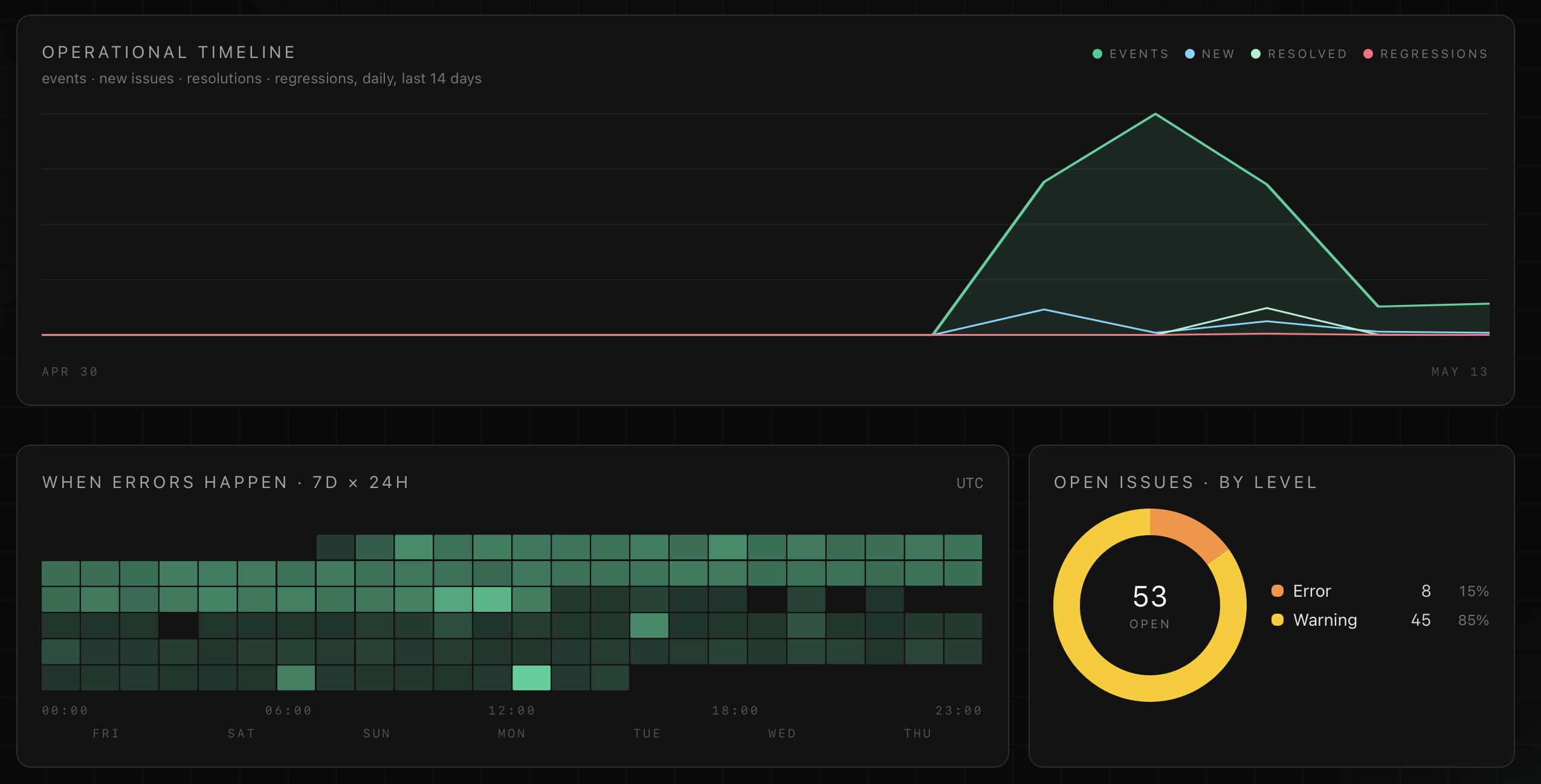
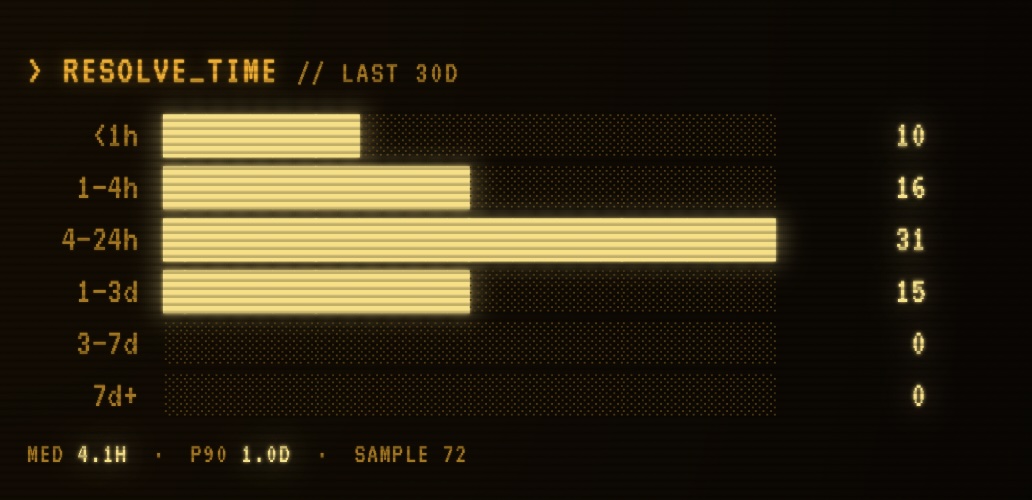
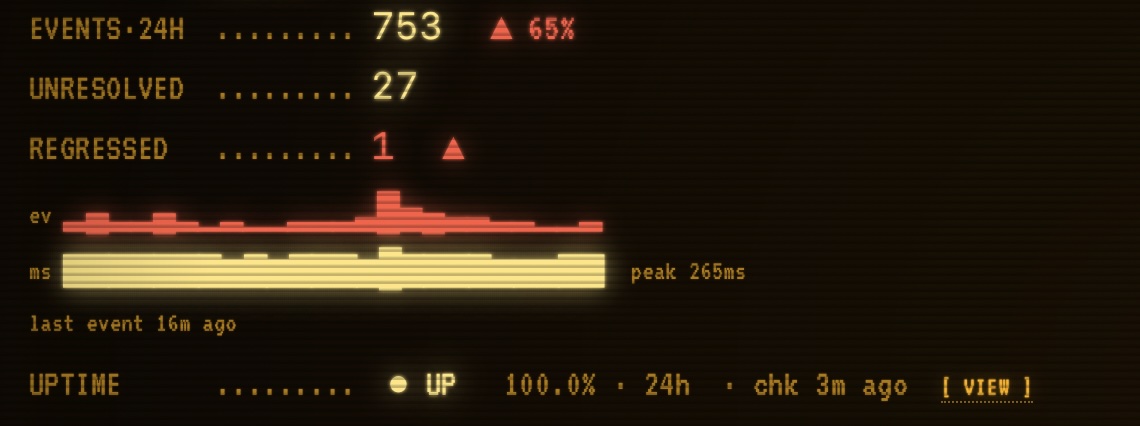
Resolve-time distribution and operational header strip — same numbers, on a CRT.
Request an invite.
We onboard new teams in small batches so support stays tight and the roadmap stays honest. Drop your email and we'll be in touch when the next slot opens.